


Upgrade Your Streaming Experience with the Right Remote
Dec 05, 25
Upgrade Your Streaming Experience with the Right Remote
In today’s streaming-heavy world, the remote control can make or break your viewing experience. If you’re using a media stick like the Amazon Fire Stick (3rd Generation) or a compatible device, swapping out the standard remote for a better one can bring real benefits: faster access to apps, voice search, cleaner controls, and fewer frustrations.
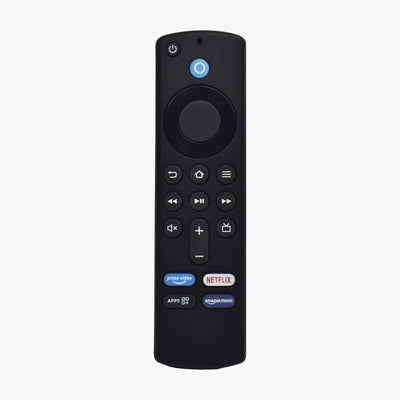
That’s where the “Original Replacement Remote Compatible with Fire Stick 3rd Generation Voice Control Feature [Pairing Required Before USE]” from LRIPL comes in.
What You Get with This Replacement Remote
According to the product page, this remote offers:
-
Includes Alexa Voice Remote with Power and Volume Buttons” – i.e., it’s not just for basic navigation but lets you control power/volume of your TV and soundbar.
-
All-New Preset Buttons get you to Favorite Apps Quickly” – handy shortcuts for Netflix, Prime Video, etc.
-
Voice search: “Easily Search, Play, Pause, Rewind, or Forward Content with Just your Voice.
-
Sleek black design, and built by a company (LRIPL) established in remote-control solutions since 1995.
Compatibility & the Important “Pairing Required Before USE”
It’s labeled specifically as “compatible with Fire Stick 3rd Generation”. That means:
-
You should have a Fire Stick (3rd gen) or something closely compatible.
-
Before you can use the remote, you must pair it with the Fire Stick. The product text emphasises: “Kindly note that this remote requires pairing before use. Please follow the pairing process…”
Pairing ensures that the Fire Stick recognises the remote, especially since features like voice control/power/volume will likely use Bluetooth or a RF/IR combined signal, not just simple IR.
Key Features in Detail
Voice control
You can speak commands instead of scrolling endlessly. Want to jump to “Stranger Things”? Voice it. Want to search for “best action movies 2025”? Use the mic button. That saves time and makes the experience smoother.
Power & Volume Buttons
Rather than using multiple remotes (one for Fire Stick, one for TV, one for soundbar), you can consolidate. This remote says you can control power and volume on your TV and soundbar with one remote. That’s a good feature for living-room simplicity.
Preset App Buttons
These allow one-press access to popular apps. If you’re constantly launching Netflix or Hotstar or Prime, these buttons reduce the steps.
Range and build quality
A remote that works well from a distance (approx 28 feet) means you’re less constrained. The mention of “built with quality materials for durability” also suggests it’s designed for everyday use.
Benefits for the Typical User
-
If you’ve lost your original remote or it’s malfunctioning, this is a drop-in replacement with added features.
-
If you want quicker access, fewer remotes, simpler control.
-
If you use your Fire Stick often (movies, shows, sports) and want voice control without spending on the official Amazon remote.
-
Great for households where multiple users might struggle with complicated remotes. Simplicity helps.
Things to Check Before You Buy
-
Compatibility: Ensure your device really is the Fire Stick 3rd Generation (or compatible). If you have an older/newer Fire device, confirm compatibility.
-
Pairing process: Given that pairing is required, check that you’re comfortable performing it. The product mentions support via WhatsApp if you have doubts.
-
Power/volume integration: Verify that your TV/soundbar support remote-control via the Fire Stick remote (some TVs may need IR or HDMI-CEC enabled).
-
Return/warranty policy: Since remotes have a lot of failure points (buttons wear out, voice mic issues), check that you can return or get support.
-
Build quality & battery: Even if the spec is good, check user reviews (if available) for how well the remote holds up over time.
How to Set It Up – Step-by-Step
Here’s a general approach you can use to pair a replacement remote with a Fire Stick-type device:
-
Insert batteries into the remote (ensure correct orientation).
-
On your Fire Stick, go to Settings → Controllers & Bluetooth Devices → Amazon Fire TV Remotes → Add New Remote.
-
Press and hold the Home button (or the dedicated pairing button) on the replacement remote for ~10 seconds until the indicator light flashes (if applicable).
-
On screen you should see “Remote Found” or similar. Select it.
-
Follow any prompts: maybe test the voice button, test the volume/power functions.
-
If the power/volume buttons do not control your TV/soundbar, go to Settings → Equipment Control → Manage Equipment → TV → Change Remote → Continue and follow the steps to teach/control the TV’s IR or HDMI-CEC signals.
-
Test voice commands: speak “Launch Netflix” or “Search for comedy movies” to verify mic works.
-
Keep the remote within the indicated range (the product mentions up to ~28 feet).
Tip: Place the Fire Stick with clear line of sight (if IR-based) or ensure the Bluetooth channel is unobstructed. Avoid heavy metal furniture between the remote and device.
Conclusion
If you’re looking for an affordable, feature-rich replacement remote for your Fire Stick 3rd Gen, the LRIPL model is a strong contender. With voice control, dedicated app buttons, power/volume integration and a trusted manufacturer behind it, it ticks many boxes. Just be sure your device is compatible, follow the pairing instructions, and set it up properly, and you’ll be streaming smoother in no time.
Ready to upgrade? You can grab it from the LRIPL shop and start enjoying a more streamlined remote experience.


